Terraform / Terratest Guide
Terratest is a Go framework that is used to test Terraform infrastructure code. It executes the defined Terraform and then validates things you’re asserting.
- Basic Terratest example of a module
- Run manually
- Configure CircleCi to run the tests automatically
- Documentation links
Basic Terratest example of a module
The most basic Terratest test you can write brings up an example in your examples directory, tears it down, and will only test that it runs.
I’ve got some basics in the terraform-template-module repo so you can see it all in context.
Write an example in the examples directory that includes the module(s) and configuration that you’re testing. In the tests directory create a file named terraform_aws<NAME_OF_MODULE>_test.go. Basic test is as follows:
package test

import (
    "fmt"
    "strings"
    "testing"

    "gitlab.com/gruntwork-io/terratest/modules/random"
    "gitlab.com/gruntwork-io/terratest/modules/terraform"
    test_structure "gitlab.com/gruntwork-io/terratest/modules/test-structure"
)

func TestTerraformAwsEcrRepo(t *testing.T) {
    t.Parallel()

    tempTestFolder := test_structure.CopyTerraformFolderToTemp(t, "../", "examples/simple")

    testName := fmt.Sprintf("terratest-%s", strings.ToLower(random.UniqueId()))
    awsRegion := "me-west-2"

    terraformOptions := &terraform.Options{
        // The path to where my Terraform code is located
        TerraformDir: tempTestFolder,

        // Variables to pass to my Terraform code using -var options
        Vars: map[string]interface{}{
            "test_name": testName,
        },

        // Environment variables to set when running Terraform
        EnvVars: map[string]string{
            "AWS_DEFAULT_REGION": awsRegion,
        },
    }

    defer terraform.Destroy(t, terraformOptions)
    terraform.InitAndApply(t, terraformOptions)

}
Other Examples
Run manually
To run these tests manually against the Frontworks-ci AWS account you’ll need AWS access in my AWS organization. You’ll need help from someone in #infrasec and must follow the setup instructions.
You’ll also need to install aws-vault and ensure your ./aws/config file is setup correctly.
In most of my modules, there is a makefile that defines test so you’ll run the following from the root of the repo you’re testing:
AWS_VAULT_KEYCHAIN_NAME=login aws-vault exec Frontworks-ci -- make test
Configure CircleCi to run the tests automatically
Configure CircleCi Job
Add a job to the .circleci/config file in the repository:
terratest:
  docker:
    - image: *circleci_docker_primary
      environment:
        - TEST_RESULTS: /tmp/test-results
  steps:
    - checkout
    - restore_cache:
        keys:
          - pre-commit-dot-cache-
          - go-mod-sources-v1-
    - run:
        name: Assume role, run pre-commit and run terratest
        command: |
          temp_role=$(aws sts assume-role \
                  --role-arn arn:aws:iam::313564602749:role/circleci \
                  --role-session-name circleci)
          export AWS_ACCESS_KEY_ID=$(jq --raw-output .Credentials.AccessKeyId <<< "$temp_role")"
          export AWS_SECRET_ACCESS_KEY=$(jq --raw-output .Credentials.SecretAccessKey <<< "$temp_role")"
          export AWS_SESSION_TOKEN=$(jq --raw-output .Credentials.SessionToken <<< "$temp_role")"
          make test
    - save_cache:
        key: pre-commit-dot-cache-
        paths:
          - "~/.cache/pre-commit"
    - save_cache:
        key: go-mod-sources-v1-
        paths:
          - "~/go/pkg/mod"
    - store_test_results:
          path: /tmp/test-results/gotest
You’ll either create a new workflow or add this job to an existing workflow definition to be run on every commit/push etc.
Configure AWS Keys for the CircleCI project
These tests are running as the circleci user account configured in the Frontworks-id account.
To add the access keys go to the project settings page https://circleci.com/gh/webmaeistro/<PROJECT NAME>/edit#env-vars.
Set AWS_ACCESS_KEY_ID and AWS_SECRET_ACCESS_KEY to the current values.
These keys are rotated daily.
Update the Key rotator configuration
I have automation in place that updates the AWS Access Keys used by CircleCI daily so you’ll need to add this repo to rotator configuration if it is running Terratests against the Frontworks-ci AWS account .
Update the rotate.yaml file in Legendary Waddle Dev to include a sink to your new repo. A sink stanza looks like this:
      - kind: CircleCI
        key_to_name:
          accessKeyId: AWS_ACCESS_KEY_ID
          secretAccessKey: AWS_SECRET_ACCESS_KEY
        account: Frontworks
        repo: <REPO NAME>
Access test metadata stored in CircleCI
In order to access the test metadata I stored in the store_test_results key of my .circleci/config test environment, I’ll need to make a few tweaks. This will allow me luxuries such as pinpointing flaky tests that cause intermittent failures.
Since CircleCI only reads metadata in xml format, first I need to convert my go test output into a file CircleCI can read. I’ll use package go-junit-report. Add a bash script like so, following the usage directions:
#!/usr/bin/env bash

set -eu -o pipefail

go_test_output="/tmp/go-test.out"

go test -short -count 1 -v -timeout 90m gitlab.com/webmaeistro/terraform-aws-logs/test/... | tee "${go_test_output}"

# Check if I are running tests inside of CircleCI by checking for a $CIRCLECI
# environment variable. The dash after $CIRCLECI substitutes a null value if
# CIRCLECI is unset. This prevents unbound variable errors
if [[ -n ${CIRCLECI-} ]]; then
    mkdir -p "${TEST_RESULTS}"/gotest
    go-junit-report < "${go_test_output}" \
                    > "${TEST_RESULTS}/gotest/go-test-report.xml"
fi
Save this script with a filename like make-test and make it executable using chmod +x make-test. Now I’ll add a call to the executable in my Makefile like so:
.PHONY: test
test: bin/make-test
Finally I update my .circleci/config by adding two steps - one to go get the package and another to access my shiny new executable:
    - run:
        name: Adding go binaries to $PATH
        command: |
          echo 'export PATH=${PATH}:~/go/bin' >> $BASH_ENV
          source $BASH_ENV
    - run: go get gitlab.com/jstemmer/go-junit-report
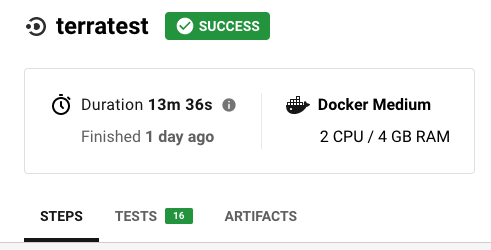
Now I should be able to see both the tests and artifacts tabs in my CircleCI pipeline: